Selling Your Book
We break down our online bookstore and book ordering, plus we provide some promotional strategies to share your new book.
Balboa Press Bookstore
Your book detail page is your book’s information hub where readers can learn about and purchase your title. Features include:
- “Overview” tab – provides readers a brief synopsis of your book
- “Free Preview” tab – offers a short sample from you book
- “About the Author” tab – features your author biography information
- “Editorial Reviews” and “Customer Reviews” tabs – allows book editors and customers to post reviews of your book
If you have purchased any Video Services, your videos can be added to your book detail page.
Your book detail page will also feature a recommended titles section that suggests similar Balboa Press books to customers viewing your book detail page. Additionally, if your title is available as an e-book, the Google Preview service will allow potential readers to sample a limited number of pages by clicking the “Google Preview” button.
NOTE: All changes made to your book detail page will be reviewed by Balboa Press and posted after one business day.
Log in to your Author Center account and click on the “Book Status” tab to edit your book detail page.
Changes you make to your book detail page will take at least one business day to appear. If your changes are not displaying after the next full business day, please contact customer support at 844.682.1282, or by email at customersupport@balboapress.com.
If the review contains objectionable material, promotional content, inappropriate content, or off-topic content, we reserve the right to remove the review. Negative reviews that use obscene language or personally attack the author will not be posted. However, negative reviews that contain respectful criticism relevant to the book will be posted, and we will not consider an author's request to have those reviews removed. Our intention is to foster genuine conversation among readers.
If you have concerns about a specific review, please contact us and provide all the relevant details.
Please visit the bookstore and search for your title or pen name. Find your book in the search results and click on the title to be taken to your book detail page. If you cannot find the link, contact customer support at 844.682.1282 or by email at customersupport@balboapress.com.
The “New Releases” section is updated automatically as books are published, newest-first. If your book is not displayed, it's possible newly-published titles have already pushed it down the list. If you believe your book may not have been listed, please contact customer support at 844.682.1282 or by email at customersupport@balboapress.com.
Trending books are determined by the number of copies sold through the Balboa Press bookstore over the past month (retail channel sales and direct sales made by an author do NOT count toward this figure). The trending books section of the bookstore is updated monthly.
If you have any additional questions about the Balboa Press bookstore, please contact customer support at 844.682.1282, or by email at customersupport@balboapress.com.
Book Sales and Ordering
If you want to purchase copies of your book, just get in touch with the Balboa Press Book Sales Department at 844.682.1282.
To gain retailer validation and order books at a discounted price, call 844.682.1282 and follow the prompts. A retail sales consultant will help you validate your retailer status and place your order(s).
Customers can place orders directly through the bookstore by logging into an Author Center account, or by opting to purchase as a guest.
Shopping at Balboa Press is safe. We provide a secure server that uses encryption for all purchases and anything involving your personal account information.
If you're uncomfortable placing an order online, we can help. For an offline order, walk through the steps as if you were placing the order online. On the "Final Purchase Approval" page, you will be given the option to print out an order form. You may fax the order form to us with your credit card number, or you may mail your order form to us with a certified check or money order payment.
When placing a book order, you will be asked to log in to your Balboa Press account before checking out. If you do not have an account, you can create one on the login page as you continue to check out, or you may sign in and purchase as a guest.
NOTE: Those who sign in as a guest will not be eligible to receive an author discount or retailer discount.
If you need to place a volume book order, please contact the book sales team at 844.682.1282.
Through the advanced search engine, you can find books you are looking for by searching the name of the book, author’s name, genre, subject, or by keywords that may be associated with the book.
We accept payment using Visa, MasterCard, Discover and American Express cards. To avoid the long delays that often occur when waiting for personal checks to clear the bank, we accept only certified checks and money orders. Checks must have a valid nine-digit bank routing number (ABA code) at the bottom.
Online payments can be made by logging in to your Balboa Press account and proceeding through the checkout process. Once you reach the payment page, select your card type and enter the name on the card, the card number, the expiration date and the security code.
Shopping at Balboa Press is safe. We provide a secure server for all purchases and anything involving your personal account information. This server utilizes an encryption technology designed to protect the information you provide. Should you prefer not to submit your credit card number online when buying, we do provide an opportunity to print out your order form to mail or fax to us with your credit card number, or you can mail your order form with a certified check or money order payment.
Print-on-demand orders are non returnable and non refundable, except in the event of poor print quality or an error in quantity. Please report quality or quantity issues to the book sales department at 844.682.1282 immediately upon receipt of the order. All claims must be filed within 30 days of shipment receipt.
Sideloading Kindle Fire with access to a computer (easiest):
- Using a mini USB to USB cord, connect the Kindle Fire to a computer.
- Download the e-book file on your computer.
- Using a file explorer program, open up the Kindle (will show as a temporary drive). Also open the folder on the computer with the file.
- Drag the e-book file from the computer to the Kindle Fire Books directory.
- Follow your computer’s procedure for disconnecting peripheral devices. The book will now be available in the Kindle Fire’s “Books” tab.
Sideloading using only the Kindle Fire:
- Download the e-book file to the Kindle Fire using either the browser or via email.
- Download and install a file explorer program, such as ES File Explorer from Amazon APP market (it’s free).
- Using the file explorer find the book file (it will be in the main Kindle directory) and copy it (press and hold the icon until the sub-menu pops up).
- Go to the “Books” folder.
- Paste the file (with ES Explorer you will need to select “Operations,” then hit paste).
- Power Kindle Fire off and back on.
- Book should be in the Books tab.
If you are interested in purchasing multiple copies of your book for your book promotion, a book signing event, or any other purpose, you can take advantage of exclusive author discounts.
|
Book Order Discounts by quantity |
|
|
Book Quantity |
Discount* |
|
1-24 |
20% |
|
25-49 |
25% |
|
50-99 |
30% |
|
100-249 |
35% |
|
250-499 |
50% |
|
500-999 |
60% |
|
1,000+ |
Call for a Quote |
*The order must be for a single title, of the same print format, and shipped to single address. We cannot accommodate mix-and-match orders. All orders must be prepaid, and shipping charges are not included in the discount structure. Please note that purchases of your book through a Book Consultant do not generate royalties and are nonreturnable.
Email confirmation will be sent at the time of shipping to your email address on file. This shipping confirmation email will allow you to track purchases online.
If you have any additional questions about the Balboa Press bookstore, please contact customer support at 844.682.1282, or by email at customersupport@balboapress.com.
BookStub™ Codes
BookStub™ codes are similar to gift cards and contain one free download of your e-book. These promotional tools are perfect for marketing your digital book in the real world. Send them out at book or networking events, offer them as contest giveaways, or keep them for everyday promotional opportunities.
BookStub™ codes are available in our e-book marketing services and are included in most Balboa Press publishing packages.
The BookStub™ Report in your Balboa Press Author Center account will allow you to keep track of the number of BookStub™ codes that have been redeemed.
Visit the BookStub™ Redemption page to enter your BookStub™ promo code and download your free e-book. You will be able to select which file format you'd like to download — ePub or PDF. Choose wisely, as you can download only one format with each BookStub™ code.
If the e-book file is displaying as "locked," it means that your computer does not have the correct software available. Reading an e-book on your computer requires Adobe Digital Editions. If you do not currently have this software, you can download it for free here.
We created the BookStub™ Report for authors who have purchased BookStub™ codes (available in our e-book marketing services and included in most publishing packages) as a way to promote their e-books. The link to this report will appear in your Balboa Press Author Center account, regardless of whether or not you are currently using BookStub™ codes.
You can run this report at any time to see how many of your BookStub™ codes were redeemed. For each BookStub™ redeemed, we'll provide you with information regarding when the e-book was downloaded as well as what format (ePub or PDF) was selected. Information in the report will become available only once a BookStub™ has been redeemed for an e-book download.
If you have a specific question that is not addressed in the FAQ database, please feel free to contact us at 844.682.1282.
Downloading a BookStub™
Click here to redeem your BookStub™ code. Once on the page, enter the promo code into the provided field and click Redeem.
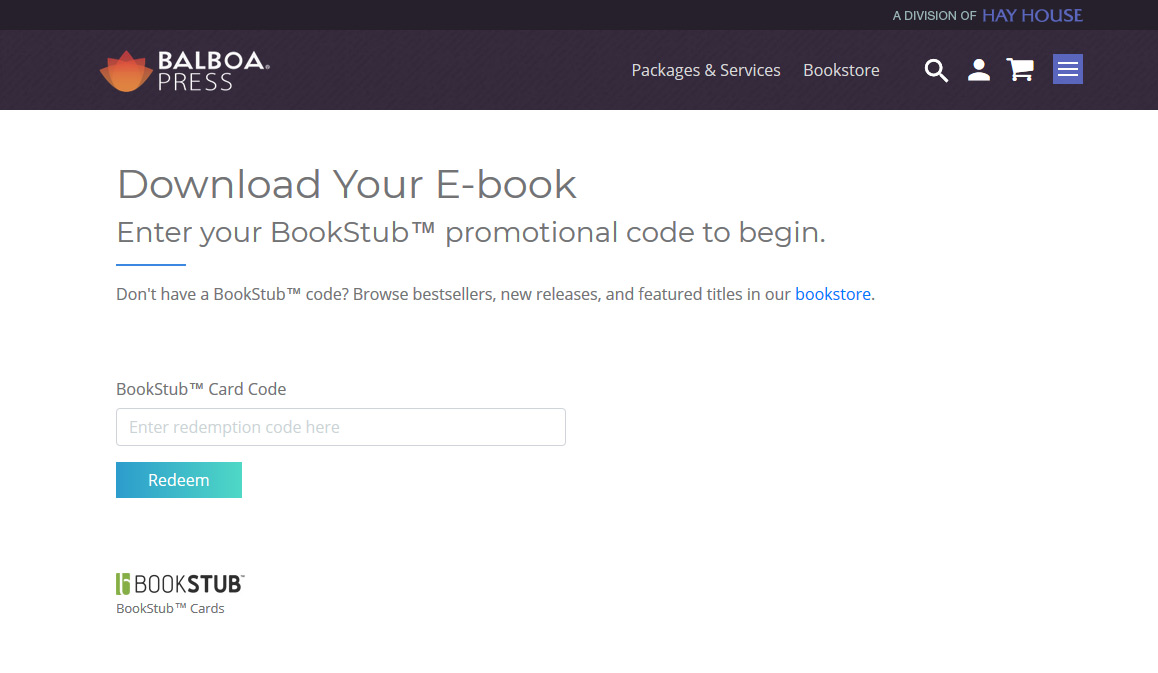
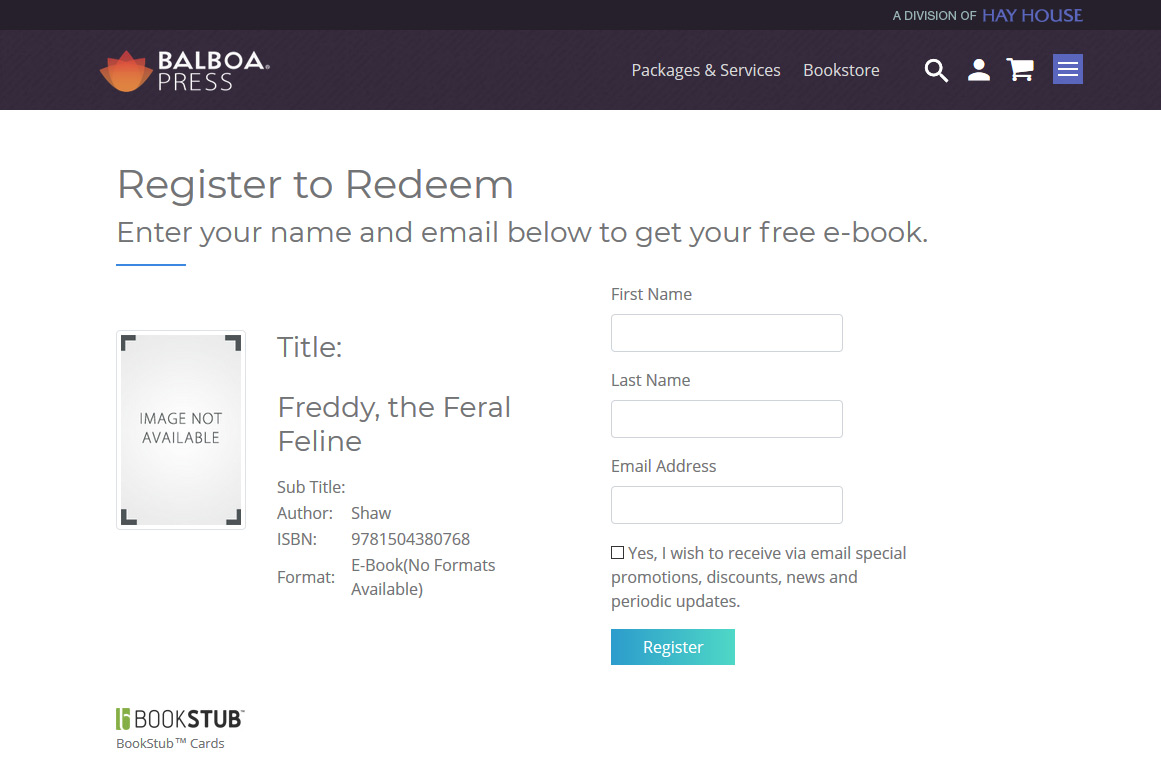
Yes, you will need to enter your first name, last name, and email address. You may check the box provided if you would like to receive email updates. Once you've entered your information, click Register.
You should then receive a confirmation email that provides the link to download your free e-book. You'll also see a link to rate and review the book, if you would like to do so.
Under the versions listed on the page (Epub, Mobi or PDF), there are devices listed. Once you find your device, choose the corresponding file type. Choose wisely, as you can only download one file type with each BookStub™ code.
When you save the e-book file to your computer, please take note of the file location. You must know the file location in order to read the e-book from your desktop, or to load the e-book onto another device. Please review the questions below for more information on how to work with specific devices.
Note: Just because you are downloading the e-book file to your desktop, with plans to load the e-book onto another device, it does not mean you should choose the PDF version. Choose the e-book version that your reading device supports.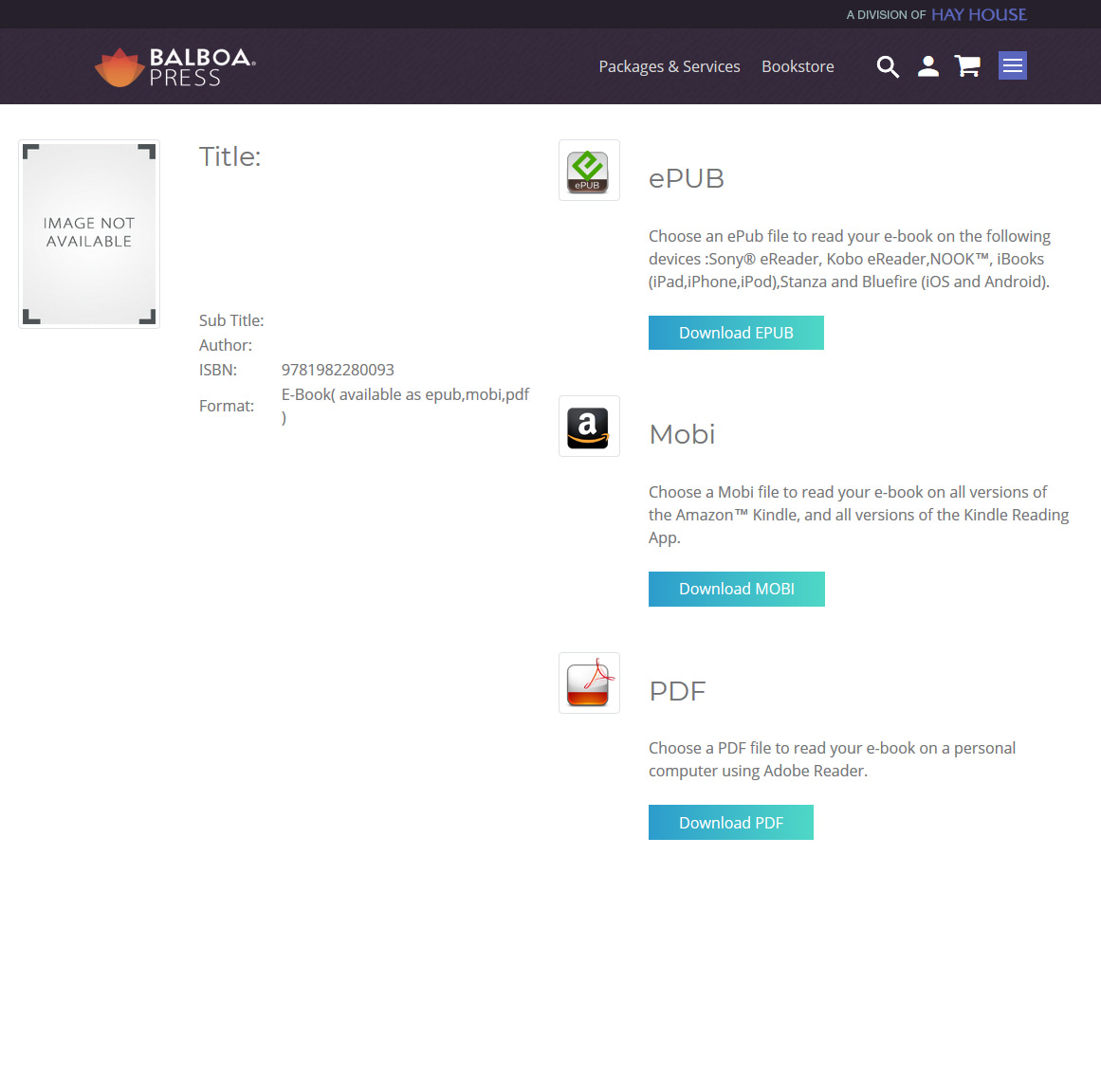
In order to view an e-book, you must install reading software on your desktop. Popular reading software for desktop computers can be downloaded at the corresponding links:
- Calibre - http://calibre-ebook.com/download
- Adobe Digital Editions - http://www.adobe.com/products/digital-editions/download.html
- EPub Reader for Firefox (this is a Firefox Add-On) - https://addons.mozilla.org/en-US/firefox/addon/epubreader/
Note: macOS has the Apple Books program, which downloads the e-book directly into your Apple Books library. In this case, you will not install additional reading software. Simply click on the PDF version to download the file to your Mac, and it will open in Apple Books.
- Click here to redeem your BookStub™ code.
- Once on the page, enter the promo code into the provided field. Click Redeem.
- Enter your first name, last name, and email address on the "Register to Redeem" page. You may check the box if you would like to receive email updates. Once you've entered your information, click Register.
- You should receive a confirmation email that provides the link to download your e-book. You'll also see a link to rate and review the title, if you would like to do so.
- Click on the ePub option to download the e-book file to your computer. Please note the location of the download, because you will need to know this in order to read or transfer your e-book.
- Open iTunes.
- Once in iTunes, click the drop down menu in the top left corner and click on the Books option.
- Then click File >> Library >> Import
- Then choose your new book from its saved location.
- Once imported, the e-book will show up in the books section of iTunes.
- Once you connect your iPad to your computer, your new e-book will display in your Apple Books application.
- Click here to redeem your BookStub™ code.
- Once on the page, enter the promo code into the provided field. Click Redeem.
- Enter your first name, last name, and email address on the "Register to Redeem" page. You may check the box provided if you would like to receive email updates. Once you've entered your ijnformation, click Register.
- You should receive a confirmation email that provides the link to download your e-book. You'll also see a link to rate and review the title, if you would like to do so.
- Once you click on the download link, you will be directed to a page titled “Choose Your E-book Version.” Choose the ePub file.
This will automatically download your new e-book to the Apple Books library on your iPad.
- Click here to redeem your BookStub™ code.
- Once on the page, enter the promo code in the field provided. Click Redeem.
- Enter your first name, last name, and email address on the "Register to Redeem" page. You may check the box provided if you would like to receive email updates. Once you enter your information, click Register.
- You should receive a confirmation email that provides the link to download your e-book. You'll also see a link to rate and review the book, if you would like to do so.
- Once you click on the download link, you will be directed to a page titled “Choose Your E-book Version.” Choose the Mobi file. The file will be downloaded to your computer/laptop – please note where the file is located.
- Attach the file to an email that you send to your Kindle email address. If it is the first time that you have used the Send-to-Kindle service, you will receive an email with instructions and help pages. You will receive a confirmation email if the email sent to your Kindle account is from an authorized sender. Once you receive the confirmation email, your e-book should be in your Kindle library. If the email is not from an authorized sender, you will receive a message notifying you that you must add an authorized sender in "Manage Your Kindle."
To add an authorized sender:
- Go to the "Manage Your Kindle" page and sign into your account.
- Go to “Personal Document Settings” under “Your Kindle Account.”
- Under "Approved Personal Document E-mail List" click "Add a new approved e-mail address."
- Enter the email address to approve and select "Add Address."
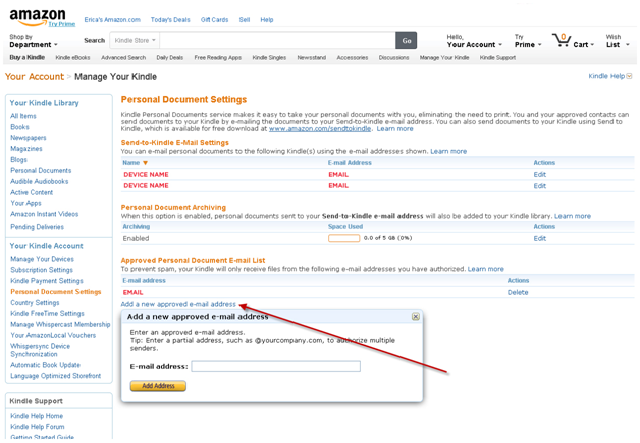
Note: If you added an authorized sender, you will need to resend the book via Send-to-Kindle. You should then get a confirmation email, and your e-book should be in your Kindle library.
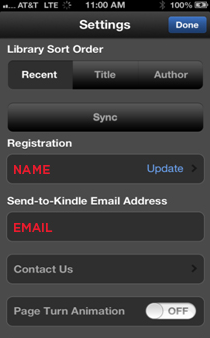
The steps will be the same as above for desktop to Kindle, if you use a Kindle application on a Mac device. However, instead of displaying in the library on your Kindle, the e-book will be downloaded in the app on your Mac device.
The settings in the Kindle app will look like this:
- Click here to redeem your BookStub™ code.
- Once on the page, enter the promo code in the field provided. Click Redeem.
- Enter your first name, last name, and email address on the "Register to Redeem" page. You may check the box provided if you would like to receive email updates. Once you've entered your information, click Register.
- You should receive a confirmation email that provides the link to download your e-book. You'll also see a link to rate and review the book, if you would like to do so.
- Once you click on the download link, you will be directed to a page titled “Choose Your E-book Version.” Choose the Epub file. Please note the location of the file on your desktop computer.
- At this point, your book is not in a file format that your Nook can open. Download Adobe Digital Editions. This will allow you to convert your e-book into a file type that your Nook can open.
- Once you have converted your book to a readable file, plug in your Nook and drag the file from your desktop computer onto your Nook.
Sideloading Kindle Fire with access to a computer (easiest):
- Using a mini USB to USB cord, connect the Kindle Fire to a computer.
- Download the e-book file on your computer.
- Using a file explorer program, open up the Kindle (will show as a temporary drive). Also open the folder on the computer with the file.
- Drag the e-book file from the computer to the Kindle Fire Books directory.
- Follow your computer’s procedure for disconnecting peripheral devices. The book will now be available in the Kindle Fire Books tab.
Sideloading using only the Kindle Fire:
- Download the e-book file to the Kindle Fire via your browser or via email.
- Download and install a file explorer program, such as ES File Explorer from the Amazon app market (it’s free).
- Using the file explorer, find the book file (it will be in the main Kindle directory) and copy it (press and hold the icon until the sub-menu pops up).
- Go to the Books folder.
- Paste the file (with ES Explorer, you will need to select “Operations,” then hit paste).
- Turn your Kindle Fire off and back on.
- The e-book should display in the Books tab.
Book Marketing
When Balboa Press finishes publishing your book it will be available for purchase in our online Bookstore. Anyone can purchase a copy of your book through our Bookstore or through the 25,000 world-wide retailers who use the Ingram Book Network.
Distribution means that your book can be purchased by thousands of retailers and made available on their websites or bookstores. This allows you to reach a wide audience and compete in the book marketplace.
If your publishing goals include more than giving away copies of your book to friends and family, book distribution is essential. Although it may sometimes be possible to sell directly to bookstores, booksellers prefer dealing with wholesalers and distributors rather than entering into transactions with individual authors.
Once you publish with Balboa Press, your book will be available through a number of distribution channels: the Books in Print® database, our online bookstore, and two leading book wholesalers in the United States—Ingram and Baker & Taylor. For orders from other areas of the world, our international print network can facilitate the speedy delivery of your books.
Your book will also be available for sale online through external retailers such as Amazon, Barnes & Noble, and other resellers that may pick up your book from the Ingram and Baker & Taylor distribution networks.
Channel Limitation: Author pen names must not exceed 38 characters.
No. Retailers are responsible to update their websites when changes with books they’ve purchased are made. We cannot do anything about the listings on their website. If a customer attempted to purchase an expired title, the order would be rejected and not filled. In rare cases, there will sometimes be one or two physical, printed copies of your book in storage. In this case, a customer could technically order the book after the title is expired. If you are concerned about this happening with your book you should order the remaining copies yourself after the distribution is cancelled to ensure that your book is truly sold out.
A marketing plan can be written at any stage of your writing and publishing process. A marketing plan is a written document that lists the actions necessary for you to achieve your marketing goals. It is important to write down several specifics in this plan including identifying your target readers, defining your market, identifying your competitors and laying out a strategy to attract readers.
Here is a deeper look into how to clarify and define those parts of your marketing plan.
- Clearly identify your target readers, or the people who are most likely going to purchase and read your book. Some aspects to consider about this group include: age, sex, career, income, residence/location and education.
- Identify the competition. You can use the competitive book market to your advantage by studying readily available information such as which books are selling the most within your genre, top writers in your genre, the strengths and weaknesses of your competitors, the selling price of most books in your genre and research on the market demand.
- Find out the best way to reach your target readers. Consider which magazines they read, which Web sites they visit, which geographic publications they read, etc. Knowing this information can help you decide if any of the marketing services Balboa Press offers are good for you.
- Develop a position statement about your book designed to reach your target readers. This statement should highlight what separates your book from the crowd.
- Set a budget for your marketing plan. How much can you realistically spend on marketing over the next year? Over the next two years? Consider which media and marketing materials you will use as well as all the other costs associated with marketing your book.
Once you have gathered the information to answer these questions and others, you are ready to take the next step and fully develop your marketing strategy based on the information you found.
A marketing strategy should answer the “Four P’s of Marketing”: Product, Price, Place and Promotion.
PRODUCT:
The Product is your book. Your first step is to write a book you are proud of and that is error free. Secondly, you will want to write a persuasive and impressive product description that tells enough about your book to pique a reader’s interest, but not give the whole plot line away. How do you want to position your book within your target market? Use your description to shape how the customer will read your book.
Another part of Product is to consider how the front cover will look. An attractive and engaging front cover will draw readers in. For assistance in designing a cover don’t forget that Balboa Press has professional cover designers and illustrators ready to assist you.
PRICE:
Price is where you develop a general pricing strategy for your book. With Balboa Press, the final selling price of your book is based on book type (softcover, hardcover or color), book size and page count.
PLACE:
Place is important to think about in your marketing plan because it takes into consideration where you will distribute your book. It is especially important to keep your target audience in mind when thinking about place because you want your book to be available where your readers live. Place includes physical locations like various cities and bookstores as well as online availability. Seriously consider the advantages and disadvantages of each place distribution before going forward. A good place to start is at a local bookstore near your home. By placing your book in this store you can use the local author connection to your advantage. Trying to get your book in a Chicago bookstore when you live in Florida may not work to your advantage because your work will get lost in the crowd.
Selling your book online means it has the potential to reach a global audience. Balboa Press offers an ISBN and Channel Distribution through the Ingram Book Network which means your book will be available through thousands of online retailers and physical bookstores. Another option to really set your book apart when it comes to approaching bookstores is our Booksellers Return Program. This valuable “insurance” guarantees retailers can return your book if it doesn’t sell. Bookstore retailers will feel more comfortable purchasing your book and taking a chance on you if they know your book can be returned.
PROMOTION:
Promotion is the specific way you plan to use advertising to work to your advantage to sell books. This is where various media outlets, promotional materials, marketing products and networking truly come into play. Don’t limit yourself to one type of promotion; consider many different ones always keeping your target audience in mind. Options to consider are: having a professional reviewer write a review about your book, setting up a social media presence, running an ad in a local newspaper or magazine, sending out a press release, conducting a radio or television interview and sending out postcards to loyal readers. Balboa Press offers many marketing services that can help your promotional efforts.
Three words to keep in mind when dealing with the media are professional, polite and direct. Get your point across, but be considerate of their time – they do not always need to talk to you for long periods of time.
Another thing to keep in mind when dealing with the media is to follow up with the contacts you’ve made. If you distribute a press release, follow up within a week or two at the most. It is your responsibility to contact the media, not theirs. To get results you must be consistent in following up. When conducting your follow up phone call with the person you sent your press release to, take charge of the conversation. Do not expect them to remember you or remember receiving your press release. He or she will most likely say “no” and hang up on you. Rather, state your name and remind the person that you sent him or her a press release. Do not ask for an interview, a story or a review. Explain that you are calling to provide further information about yourself and your book and that you would like to send him or her a free review copy of your book. Make sure to mention any events related to your book that have occurred since you sent the press release. The media person you speak with has the right to turn you down and you must respect that and move on to the next person.
If you are granted an interview some questions to consider are: How did you come up with the idea for the book? What is your background, education, and/or other interests? Is there anything interesting about research you conducted for your book, such as interesting facts, or the mode of research collection? How does your book connect with local interests in the area your interview will be broadcast? What other works or authors have inspired you? Work on answering these and other questions with confidence. Practice speaking in front of a mirror so you can watch your gestures and body language if the interview is in person not over the phone.
It is crucial to always have promotional material on hand wherever you go. You never know who you may meet somewhere. Balboa Press can help you with promotional material such as business cards, bookmarks, postcards and book signing kits.
We suggest you do not start marketing your book to physical bookstores until you have the following necessary book features: a well designed cover and interior, edited content, retail distribution through Ingram Book Distributors and a Balboa Press ISBN. These features are necessary for your book to be seriously considered by a retailer. Another suggested product is the Booksellers Return Program insurance. This valuable insurance tells book retailers they can take a chance on your book and return it if the book doesn’t sell. Sometimes larger bookstore chains cannot purchase books by a new author if the book does not have Booksellers Return Program.
Once your book is published, start by contacting a local librarian or bookstore manager to set up a book signing, speaking event or reading to build local interest. Next, try to organize a book selling event with a smaller, independent book store to gain experience and local interest. When you move on to approaching larger chains, you can provide examples of your success and will have more local support. When visiting with managers and/or librarians, be courteous, have business cards, a sample copy of the book and a press kit on hand. If the manager or librarian cannot give you a concrete answer always follow up at a later date.
The Internet is becoming a more popular place for authors to market and sell their books. Setting up a web page and/or a blog is a great way to take your share of the Internet traffic. You are welcome to set up your own personal Web site or have Balboa Press guide you in setting one up for yourself. Balboa Press offers services that can guide you in establishing a social media presence online through popular sites such as Facebook, Twitter, a WordPress blogging platform and more. Once you have one or more Internet sites established you can include that information on your marketing material to drive more traffic to your Web and social media sites.
Another way to promote your book on the Internet is to establish it with various popular retail sites such as amazon.com, barnesandnoble.com, Google book search and others. You don’t want to miss out as more and more customers conduct their shopping online.
When setting up a website consider some of your favorite websites. Think about how they reach out to you, what pages they include, what information is listed there, what colors and designs they use, etc. Typically, most simple websites include a home page, a book-detail page (one for each book you've published), book reviews or other media appearances, events calendar, a blog and a links page.
More than almost anything else your domain name says the most about you and your website. Choose your domain name wisely. First, choose a name that is logical, such as the title of your book or your name. The domain name should also be short, so if the title of your book is long, only use part of the title. Second, use words that are easy and simple to spell. Don't use your last name if you usually have to tell people how to spell it, or if it's an uncommon spelling; just use an initial instead. Third, consider registering more than one domain name with different suffixes (.com or .net) and different spellings if there are multiple for a word you are using (such as grey and gray) or if the word is commonly misspelled (in which case, you may want to reconsider your choice). Lastly, your choice must be available. If someone else already registered your top pick, unfortunately, you're out of luck.
Keywords are also important to your website because you want it to be found through search engines. If you are unfamiliar with keywords, think about how you use the Internet and what words you would use when searching for your book or another product. How would your target audience search for your book? Think about them as well when selecting keywords. Try to incorporate various keywords into the text of your website, specifically on the home page and opening paragraphs of other pages. Advanced users can utilize the metadata, or keywords, about your website on each Web page, which search engines use to organize their search results.
No one likes to visit a website with outdated or irrelevant information. Make your visitors come back again and again by keeping your website up to date and making it easy to navigate. Information you may want to post on your website includes: upcoming events, appearances and signings, an interactive blog, book reviews and contact information. Never post anything that you are not comfortable disclosing to the general public.
We have no restrictions against you attending large marketing events such as book trade shows, book fairs, conferences, conventions and book festivals. If you would like to attend any such events it is your responsibility to thoroughly research the event and make all the arrangements for attending. Before you sign up for a book event, consider the cost/benefit balance, your marketing goals, how much exposure and/or book sales can you realistically gain, the total cost for the event (don’t forget to include the cost of a booth, an attractive display, food, travel expenses and lodging) and if the event will truly reach your target audience. Once you've fully researched an event, you'll be able to make an informed decision whether or not to attend.
By clicking “Claim My Free Guide”, you are providing your electronic signature, voluntarily authorizing Balboa Press and its affiliates to contact you using a manual or automated telephone dialing system, including pre-recorded or artificially-generated voices or messages, and to send you advertisement or telemarketing messages by email or text/SMS/MMS message to the address and phone number you have provided above. You are not required to agree to this in order to buy products or services from Balboa Press. You certify that you are over the age of eighteen (18). You’ll get up to ten (10) messages per month. Standard message and data rates may apply. Click here to view our Privacy Policy.